
Change the Address on Your Driving Licence Online
Moved to a new home? Here’s how to update the address on your DL through the Sarathi portal, the documents you’ll need, the fee, and what’s different if you’ve moved to another state.
Quick answer
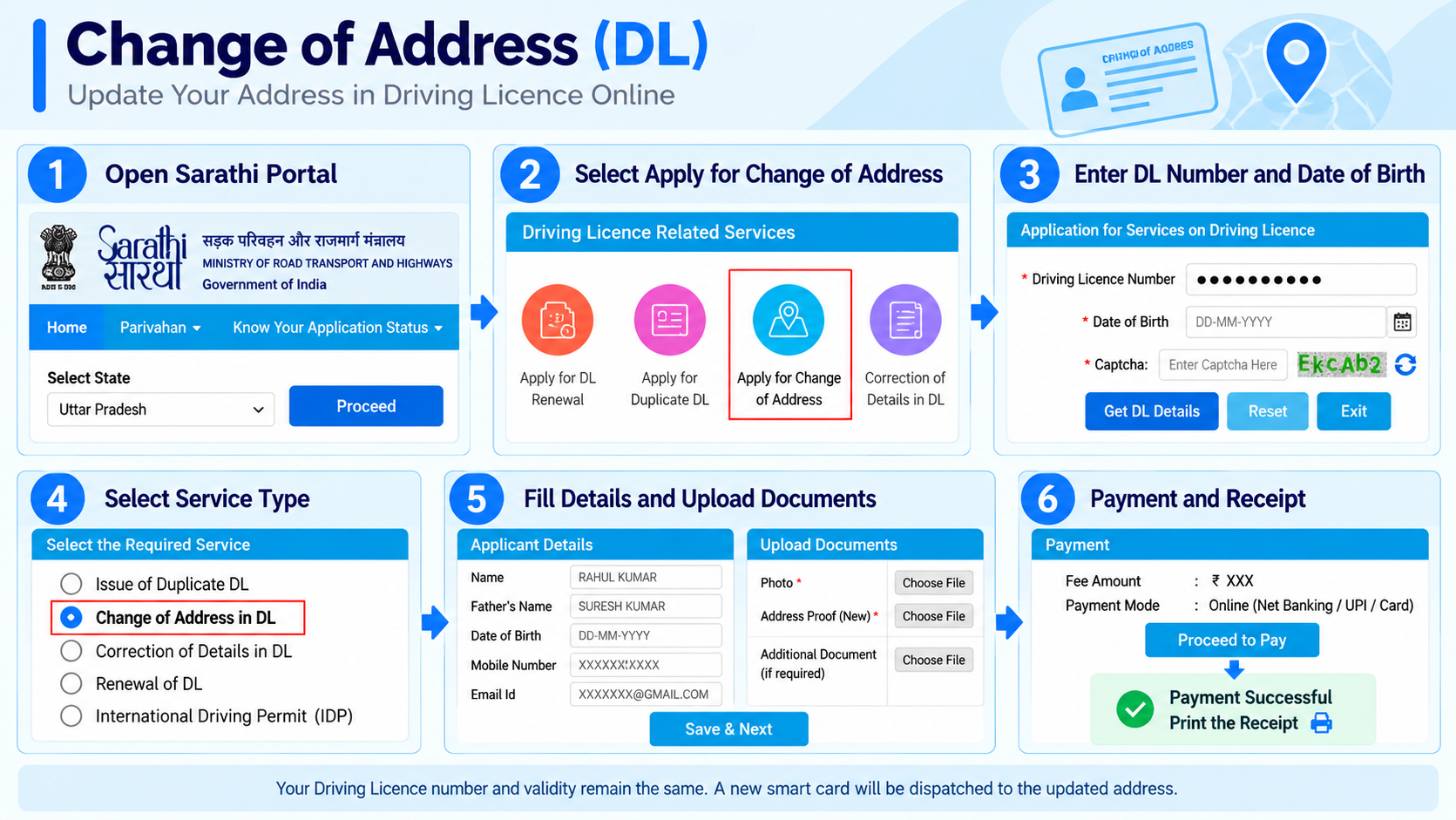
On sarathi.parivahan.gov.in, select the state and RTO that covers your new address, open Apply for Change of Address, enter your DL number and date of birth, pick Change of Address in DL, upload your new address proof, and pay the fee. Your licence number and validity stay the same, and a new smart card is posted to the updated address.
What you’ll need
The main document is proof of your new address, keep it ready before you start.
Your DL number and date of birth
Proof of new address (any one below)
Aadhaar (updated to the new address)
Utility bill (electricity/water/landline), not older than 3 months
Voter ID or passport with the new address
Registered rent/lease agreement or bank passbook
Recent passport-size photo (if your state asks)
NOC from old RTO (only if you moved to another state)
The name on your address proof must match your DL, and a utility bill must be recent (within 3 months). This is the most common reason an application gets held up.
Step-by-step: change your address on Sarathi
-
Go to Sarathi and select your state
Open sarathi.parivahan.gov.in and select the state that covers your new address. From the Driving Licence menu, choose Apply for Change of Address.
-
Enter your DL number and date of birth
On the Application for Services on Driving Licence screen, enter your Driving Licence Number and Date of Birth, fill the captcha, tick the privacy policy box, and click Proceed. (The DL number can be entered in any format.)
-
Select “Change of Address in DL”
From the eligible services shown, pick Change of Address in DL. Make sure the selected RTO covers your new present address.
-
Enter the new address and upload proof
Type your new address exactly as it appears on your proof, then upload the address proof (and photo/signature if your state asks for them).
-
Pay the fee
Pay the applicable fee online, then verify the payment status is reflected against your application.
-
Print the receipt
Download and print your application receipt, and save the application number to track it.
Track your application anytime with our DL application status guide.
Same state vs a different state
A within-state move is a simple change of address. Moving to another state is more involved.
| Same state | Different state | |
|---|---|---|
| Where you apply | The RTO covering your new address, same state’s Sarathi | The new state’s Sarathi and RTO |
| Extra step | None | Some states need an NOC from your old RTO first, confirm with the new RTO |
| Time | About a week to 10 days | Longer, verification can take 30–60 days |
| Cost | ₹200 central base, plus any state charges | Can be more, an NOC (if your state needs one) may carry its own fee |
Either way, your DL stays valid across India and your licence number doesn’t change, only the printed address is updated. If your DL is close to expiry, you may prefer to renew it as well.
Fee and how long it takes
| Item | Typical amount |
|---|---|
| Change of address (central base fee) | ₹200 |
| With state charges added (smart card, postage, etc.) | Varies by state |
| NOC from old RTO (only if your state needs it) | Varies, check Sarathi |
| New smart card by post | ~7–21 days |
A fresh smart card with the updated address is posted to your new address. Until it arrives, the digital DL on DigiLocker or mParivahan reflects the change, and you can download a copy once it’s updated.
After you submit: tracking the change
Use the application number from your receipt to follow it on Sarathi.
Application received
Your request and payment are logged and queued at the RTO.
Address proof verified
The RTO checks your uploaded proof. A name or address mismatch usually shows up here.
Approved and card printed
Once cleared, the updated licence is approved and the new smart card is generated.
Dispatched by post
The new card is sent to your updated address, this stage takes most of the 7 to 21 days.
Track it anytime with our DL application status guide, useful for a different-state change where verification takes longer.
Your DL and vehicle RC hold separate addresses
Updating one does not update the other, this trips up a lot of people after a move.
The address on your driving licence and the address on your vehicle’s RC are two separate records. Changing your DL address here does not change your RC address, that’s a separate “Change of Address” service on the Vahan portal, see our RC address change guide.
Likewise, your DL address doesn’t sync with Aadhaar, voter ID or other documents. After a move, update each one where you actually need the new address to show.
Mistakes that hold up the change
- Address proof name doesn’t match your DL exactly
- A utility bill that’s more than 3 months old
- The address you type doesn’t match the proof (spelling, pincode, house number)
- Selecting an RTO that doesn’t cover your new address
- For a different-state move, skipping the NOC when it’s required
Common questions
Does my licence number change?
No. Only the printed address changes. Your DL number, validity and driving record stay the same.
Which RTO should I select?
The RTO whose jurisdiction covers your current present (new) address, not the one that originally issued the licence.
I moved to another state, is it still just an address change?
It’s the same type of request but heavier: you apply at the new state’s RTO, some states first need an NOC from your old RTO, and verification can take 30–60 days. Confirm the requirement with the new RTO.
Is my DL valid while the address is being updated?
Yes. The licence stays valid to drive on, only the card is being reissued with the new address.
What does it cost?
The central base fee for a change of address in a DL is ₹200. Your state may add its own charges on top, and a different-state move can cost more if an NOC is needed. Confirm the final amount on Sarathi before paying.
Ready to update your address?
This takes you straight to the official Sarathi portal. myrtobuddy.com is not affiliated with it.