
Download or Print Your RC (Registration Certificate) Online
Lost your RC card or just need a copy? Here are the real, working ways to get your vehicle’s Registration Certificate, straight from the official Vahan portal, plus DigiLocker and mParivahan for a digital copy.
Quick answer
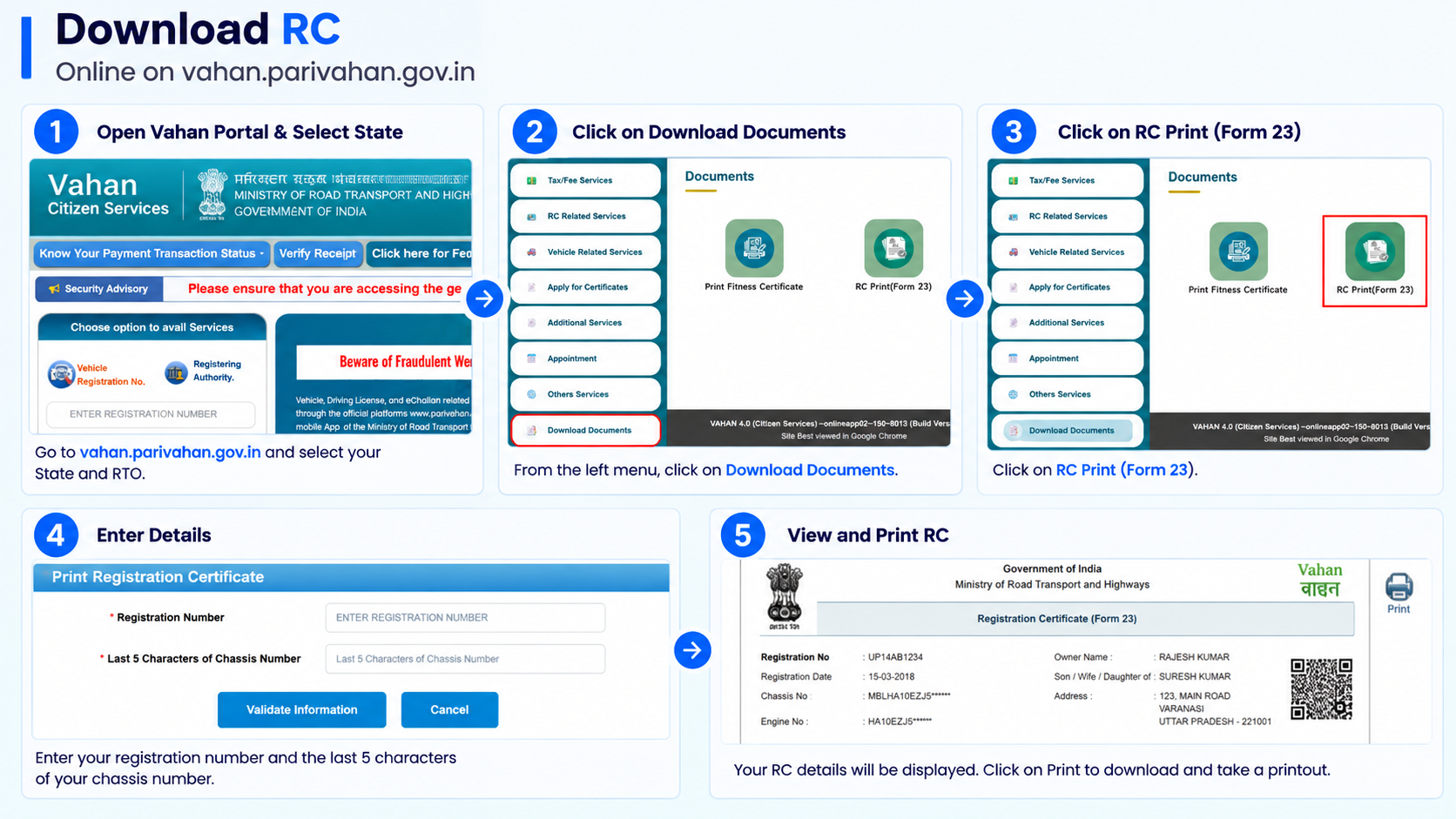
On the Vahan portal, select your state and RTO, open Download Documents → RC Print (Form 23), then on the Print Registration Certificate page enter your registration number and the last 5 characters of your chassis number and click Validate Information to view and print your RC. For a phone-friendly digital copy, fetch it into DigiLocker or view it in the mParivahan app instead.
What you’ll need
- Your vehicle registration number (the number plate), for example UP32AB1234
- The last 5 characters of the chassis number, found on your old RC, the insurance papers, or stamped on the vehicle’s chassis
- For DigiLocker: a DigiLocker account (free, signed up with your Aadhaar-linked mobile number)
- For mParivahan: the official app installed on your phone
The Vahan print service needs no login, the chassis number acts as proof you actually have access to the vehicle or its papers, since it isn’t printed on the number plate. A digital copy from DigiLocker or mParivahan is legally valid, you don’t have to carry the physical card once it’s there.
Method 1: Print your RC on the Vahan portal
The official route, no account login, you just select your RTO and validate with your registration and chassis number.
-
Open Vahan and select your state and RTO
Go to the official Vahan service portal at vahan.parivahan.gov.in/vahanservice and select the state and RTO where your vehicle is registered.
-
Open “Download Documents”
From the menu, click Download Documents (the Download Certificate section), where the document print options are grouped.
-
Click “RC Print (Form 23)”
Choose RC Print (Form 23), this is the RC itself. (The same screen also offers Print Fitness Certificate and Print NOC / No Dues, don’t confuse those with your RC.)
-
Enter your registration and chassis number
On the Print Registration Certificate page, fill in your Registration No. and the Chassis Number (last 5 characters) in the two boxes shown.
-
Click “Validate Information” and print
Press Validate Information. Once your details match the records, your Registration Certificate opens as a printable copy, save it as a PDF or print it directly from here.
Method 2: Download via DigiLocker
Best for keeping a permanent, always-accessible digital copy on your phone.
-
Open DigiLocker and sign in
Use the DigiLocker app or website. Sign in or sign up with your Aadhaar-linked mobile number and OTP.
-
Search for “Registration Certificate (RC)”
Under Issued Documents, search for Registration Certificate from the Ministry of Road Transport and Highways (Parivahan).
-
Enter your vehicle details to fetch it
Enter your registration number and the details asked. DigiLocker pulls your RC directly from the Vahan database and links it to your account.
-
View or download anytime
Once linked, your RC stays in your Issued Documents, open it anytime, even offline after the first fetch, and download the PDF whenever needed.
Method 3: View it in the mParivahan app
The official Ministry app, handy if you also want your DL and challan details in one place.
-
Install mParivahan
Download the official mParivahan app from the Play Store or App Store. The portal’s own security advisory calls out only parivahan.gov.in and the Nexgen mParivahan app as genuine, avoid look-alikes.
-
Add your RC
Open the app’s RC / Virtual RC section and add your vehicle by entering your registration number.
-
View your virtual RC
Your RC shows up as a virtual card in the app, accepted as a valid copy, similar to a DigiLocker document.
Which method should you use?
All are official and valid, pick based on how you’ll actually use the copy.
| Vahan print | DigiLocker | mParivahan | |
|---|---|---|---|
| Best for | A one-time printed copy | Long-term digital storage | Quick on-the-go verification |
| Login needed | No (just reg + chassis number) | Yes, DigiLocker account | Yes, app with mobile number |
| Works offline | No, print it once online | Yes, once fetched | Yes, once added |
| Also shows DL & challans | No | No, documents locker | Yes, in the same app |
| Accepted by traffic police | Yes, as a printout | Yes, as valid digital proof | Yes, as valid digital proof |
Under the Motor Vehicles Act, a digital RC shown through DigiLocker or mParivahan carries the same legal weight as the physical card, a screenshot of it doesn’t, so open the actual app when asked to show it.
What your RC actually shows
Once you open it, here’s what each part of the Registration Certificate tells you, useful when you’re checking a copy is correct.
Owner name & address
The registered owner and their address on record. Check the spelling matches your ID exactly.
Registration number & date
Your permanent number and the date the vehicle was first registered, this drives the validity below.
Chassis & engine number
The vehicle’s unique identifiers. These should match the numbers stamped on the vehicle itself.
Vehicle class & category
Whether it’s a two-wheeler, LMV, transport vehicle, and so on, this decides what rules apply to it.
Maker, model & fuel
Manufacturer, model, and fuel type (petrol, diesel, EV, CNG). Handy when buying or insuring.
Validity & hypothecation
The registration’s valid-until date, and whether a hypothecation is recorded against the vehicle.
Lost or damaged card? A print isn’t a duplicate RC
This trips a lot of people up. Printing a copy and getting a duplicate RC are two different things.
A Vahan print (the methods above) gives you a copy of what’s on record, fine when you just need the details or a spare printout. But if your physical RC card is lost, stolen, or damaged, you need an officially reissued card, a duplicate RC, which is a separate RTO service.
The duplicate RC is applied for on the Vahan portal (under RC Related Services → Application for Duplicate RC) using Form 26. What’s typically needed:
- A police complaint / FIR copy if the RC was lost or stolen
- A notarised affidavit stating the RC is genuinely lost
- Valid insurance and PUC certificates
- ID and address proof, and a passport photo
- A chassis pencil print of the vehicle
- Hypothecation clearance, if one is recorded against the vehicle
The fee varies by vehicle type (roughly ₹150 upward), and a reissued card usually takes about 2–4 weeks to arrive. Until then, a virtual RC on DigiLocker or mParivahan keeps you covered.
In short: need the details or a quick copy → print it. Physical card gone → apply for a duplicate RC (Form 26). Our duplicate RC guide has the full steps.
Mistakes that slow this down
- Entering the full chassis number when the page asks only for the last 5 characters
- Picking RC Print (Form 23) vs the fitness or NOC print, only Form 23 is your RC
- Selecting the wrong state or RTO on the portal, it must match where the vehicle is registered
- Trying to fetch an RC on DigiLocker with a mobile number not linked to Aadhaar, the OTP signup needs that link
- Treating a screenshot of the app as valid, always open the actual DigiLocker/mParivahan document
Common questions
Is a downloaded/printed RC legally valid?
A digital RC in DigiLocker or mParivahan is treated the same as the physical card under the Motor Vehicles Act. A plain Vahan printout is a copy of what’s on record, useful for reference, while the DigiLocker/mParivahan version is the one to show for verification.
I don’t know my chassis number, what now?
It’s on your old RC, your insurance policy, and stamped on the vehicle’s chassis. You only need the last 5 characters for the Vahan print page.
What is Form 23?
Form 23 is the Registration Certificate itself. On the Vahan Citizen Services portal, the RC download option is labelled “RC Print (Form 23)”.
Can I download my RC if it’s expired or under hypothecation?
You can still print a copy of what’s on record. If the registration validity has lapsed, renew it first; a hypothecation entry doesn’t stop you from printing the RC.
How do I just check my RC details instead of downloading?
Use the Vahan “Know Your Vehicle Details” lookup, see our RC status guide for the steps.
Ready to get your RC?
This takes you straight to the official Vahan portal. myrtobuddy.com is not affiliated with it.