
Transfer Vehicle Ownership Online (Buyer & Seller Guide)
Sold or bought a used vehicle? Ownership transfer on the Vahan portal is a two-part process, the seller starts it, the buyer finishes it. Here’s exactly what each side does, the forms and documents involved, and the deadlines that matter.
Quick answer
On the Vahan portal, under RC Related Services, the seller initiates the Transfer of Ownership (TO) first, which generates an application number. The buyer then continues the same application using that number, uploads documents, and pays the fee. The seller reports the sale within 14 days (45 days if the vehicle is registered in another state) and the buyer within 30 days; an inter-state transfer also needs a Form 28 NOC.
The one rule that trips everyone up
The Vahan portal itself flags this before you start, so get the order right.
Seller first, then buyer
- The transfer must be initiated by the seller using the TO (Transfer of Ownership) option. This generates an application number.
- Only after that can the buyer proceed, using the same TO option and entering that generated application number.
- If the buyer tries first, there’s nothing to continue, the seller has to initiate it before the buyer can do anything.
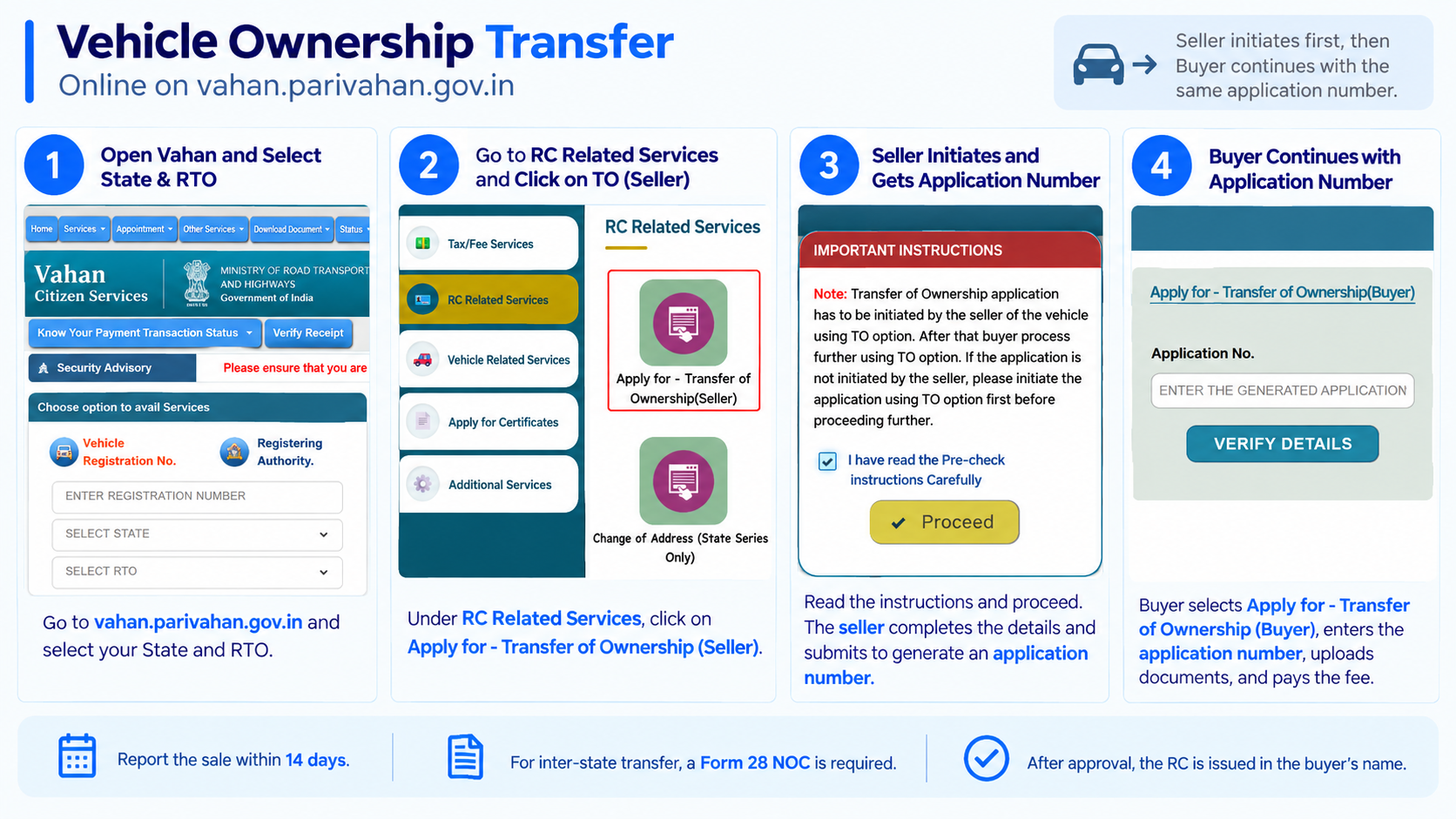
Both sides work from the same screen: Vahan portal → select your state and RTO → RC Related Services → Transfer of Ownership (Seller) or (Buyer).
Documents needed
Some are shared, some are specific to the seller or buyer. Keep clear scans ready before you start.
Shared / vehicle documents
Original RC, valid insurance certificate, valid PUC, and a copy of the sale document. Form 29 (notice of transfer) and Form 30 (application for transfer) are the core forms.
Seller provides
Signed Form 29 and Form 30, ID and address proof, and, if the vehicle is going to another state, a Form 28 NOC from the current RTO.
Buyer provides
ID and address proof, passport photo, and the fee payment. The RC is updated to the buyer’s name once approved.
If a hypothecation is still recorded on the vehicle, it must be cleared first (Form 35) before, or along with, the ownership transfer.
Step-by-step: the seller’s part
The seller starts the transfer and generates the application number the buyer will need.
-
Open Vahan and go to RC Related Services
Go to vahan.parivahan.gov.in/vahanservice, select the state and RTO where the vehicle is registered, and open RC Related Services.
-
Choose “Transfer of Ownership (Seller)”
Read the pre-check note, it confirms the seller must initiate first, tick “I have read the Pre-check instructions” and click Proceed.
-
Enter the vehicle and buyer details
Provide your registration and chassis details, verify with the OTP, and enter the buyer’s details as asked.
-
Submit and note the application number
Submit to generate the application number. Share this number with the buyer, they can’t continue without it.
Step-by-step: the buyer’s part
Once the seller has initiated it, the buyer completes the same application.
-
Open “Transfer of Ownership (Buyer)”
On the same portal, under RC Related Services, choose Apply for – Transfer of Ownership (Buyer).
-
Enter the generated application number
Type in the application number the seller shared and click Verify Details.
-
Fill your details and upload documents
Complete the buyer details, then upload the required documents (Form 30, your ID/address proof, insurance, PUC, and the NOC if it’s an inter-state transfer).
-
Pay the fee and submit
Pay the transfer fee online and submit. Save the acknowledgement, you’ll use it to track the transfer until the RC is updated.
The forms, in plain words
You’ll see these form numbers throughout the process, here’s what each one actually does.
Form 29 — Notice of transfer of ownership (seller informs the RTO)
Form 30 — Application for transfer of ownership (completes the transfer)
Form 28 — NOC from the RTO, needed for an inter-state transfer
Form 35 — Termination of hypothecation (once it’s cleared)
Form 31 — Transfer of ownership on the death of the owner
Form 32 — Transfer of ownership of a vehicle sold at auction
Fees and deadlines
The fee is modest; the deadlines are what people miss, and missing them can mean penalties.
| Item | Typical amount / limit |
|---|---|
| Transfer of ownership fee (private vehicle) | ₹300–₹500 |
| New RC smart card | ₹200 |
| Seller reports the sale, vehicle registered in the same state | Within 14 days |
| Seller reports the sale, vehicle registered in another state | Within 45 days |
| Buyer reports the transfer | Within 30 days |
Fees vary a little by state and vehicle category, and processing typically takes about 15–30 days after submission. The seller should also inform their insurer so the policy is transferred to the buyer.
Special cases
Not every transfer is a straight sale, these situations use their own form.
Owner has passed away
Transfer to the legal heir uses Form 31 (transfer on death), with succession/legal-heir proof instead of a seller’s signature.
Vehicle bought at auction
A vehicle sold through a public auction is transferred using Form 32, backed by the auction documents.
Moving to another state
Get a Form 28 NOC from the current RTO first, then re-register and transfer in the new state.
Vehicle still under hypothecation
Clear it with Form 35 (termination of hypothecation) before the ownership can pass cleanly to the buyer.
Buying used? Check the vehicle first
Before you pay or start the transfer, a few quick checks on the Vahan portal can save you from inheriting someone else’s problem.
RC & owner details
Confirm the registration is active and the owner’s name matches the seller’s ID, don’t transfer from someone who isn’t the registered owner.
Pending challans
Check for unpaid e-challans against the vehicle on the e-Challan portal, once it’s yours, clearing them becomes your headache.
Hypothecation status
Make sure no active hypothecation is recorded. If there is, it should be cleared (Form 35) before the transfer.
Insurance, PUC & chassis
Check insurance and PUC validity, and match the chassis/engine numbers on the RC to the actual vehicle.
See our RC status guide for the vehicle lookup and our e-challan guide for pending challans.
After you submit: tracking the transfer
Use the application number to follow it on Vahan. It moves through these stages.
Application under process
The seller’s initiation and the buyer’s submission are logged and queued at the RTO.
Documents under verification
The RTO checks the uploads. A missing NOC, lapsed insurance or uncleared hypothecation shows up here.
Transfer approved
Once cleared, the ownership is updated to the buyer’s name in the records.
New RC issued
The updated RC is generated in the buyer’s name and dispatched, usually within about 15–30 days of submission.
Once approved, the buyer can pull the updated RC, see our download RC guide for the print, DigiLocker and mParivahan options.
Mistakes that stall a transfer
- The buyer trying to start first, the seller must initiate the TO before the buyer can continue
- Losing the generated application number, the buyer needs it to proceed
- Skipping the Form 28 NOC for an inter-state transfer
- Leaving an uncleared hypothecation on the vehicle
- Missing the deadline to report the sale (14 days, or 45 days for a vehicle registered in another state), delays can attract penalties and leave the seller liable for the vehicle
Common questions
Who starts the ownership transfer, buyer or seller?
The seller. The transfer must be initiated by the seller using the TO option, which generates an application number. The buyer then continues with that number. If the seller hasn’t initiated it, the buyer can’t proceed.
Does the registration number change after transfer?
No. Only the owner’s name on the RC changes. The number stays with the vehicle, unless it’s moving to another state and being re-registered there.
Why does the seller need to report the sale on time?
Until the transfer is recorded, the seller remains the registered owner, and can be held responsible for challans or incidents involving the vehicle. Reporting the sale on time protects the seller.
Do I need a NOC to transfer within the same state?
No. A Form 28 NOC is only needed when the vehicle is moving to a different state or RTO jurisdiction. A same-RTO transfer doesn’t need it.
What about insurance?
The insurance should be transferred to the buyer’s name too. The seller should inform the insurer so the policy reflects the new owner, otherwise a claim can be complicated.
How do I check the transfer status afterwards?
Use the acknowledgement / application number with the application status option on the Vahan portal. Our download RC guide to get the updated RC once it’s issued.
Ready to transfer ownership?
This takes you straight to the official Vahan portal. myrtobuddy.com is not affiliated with it.