
Update Your Mobile Number on Vahan & Sarathi
Every OTP for online RTO services goes to your registered mobile number, so an old or wrong number locks you out. Here’s how to update it yourself: on Vahan for your vehicle (RC), and on Sarathi for your driving licence (DL).
Quick answer
For your vehicle (RC), use the Vahan Mobile Number Update page and validate with your registration, chassis and engine numbers. For your driving licence (DL), use the Sarathi Mobile Number Update page and validate with your DL number and date of birth. Both then send an OTP to your new number to confirm it, no RTO visit needed if your details match the records.
Why the registered number matters
Almost every online service checks your identity with an OTP to the number on file. If that number is dead, you can’t complete any of them.
Applying for LL / DL
Aadhaar and application OTPs on Sarathi go to your registered mobile.
RC services
Duplicate RC, ownership transfer and address change all send an OTP to the registered number.
Finding your application number
The find application number search asks for the mobile number you gave, useless if it’s outdated.
Alerts & reminders
Expiry, renewal and status SMS alerts land on the registered number too.
What you’ll need
The two portals ask for different details, keep the right set ready.
For your vehicle (Vahan)
Registration number, full chassis number, full engine number, registration date, and the registration/fitness valid-upto date.
For your driving licence (Sarathi)
DL number, date of birth, and the DL holder’s last transaction state.
And of course, the new mobile number you want registered. If you don’t have the full vehicle details, the portal advises visiting your RTO to get them updated.
Keep your Aadhaar-linked number reachable. To confirm you’re the genuine owner, the portal sends a verification OTP, and depending on the portal and state this often goes to your Aadhaar-linked (or existing registered) mobile, especially on Sarathi. You still choose the new number that gets saved, Aadhaar is only used to prove it’s really you, it doesn’t force a particular number.
Quick shortcut: when you open the Sarathi portal, a “Scan Or Click To Update Your Mobile Number” popup appears with direct links (and QR codes) for both Vahan and Sarathi. It’s the fastest way to jump straight to either form, without hunting through the menus.
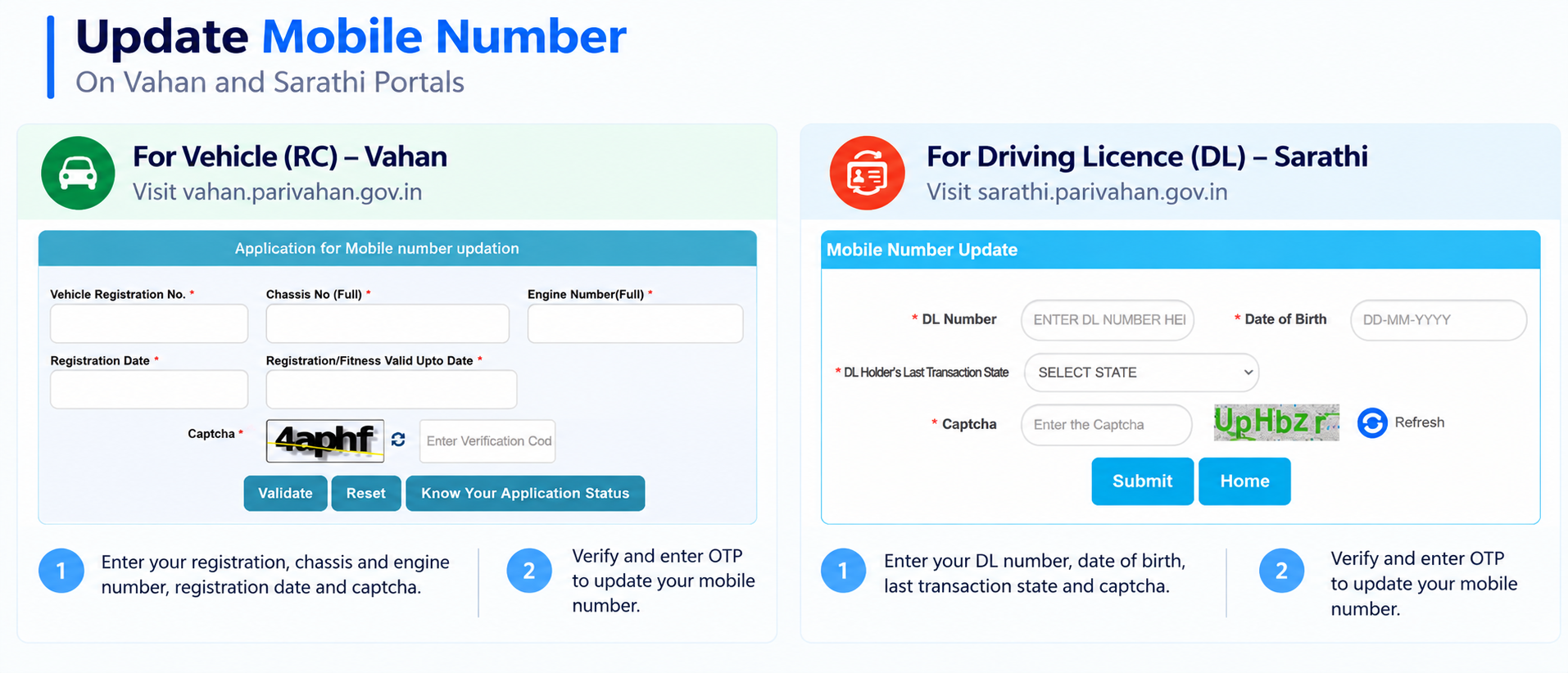
Update your number for a vehicle (Vahan)
Use this for the number linked to your Registration Certificate.
-
Open the Vahan Mobile Number Update page
Go to vahan.parivahan.gov.in/mobileupdate, the “Application for Mobile number updation” page.
-
Enter your vehicle details
Fill in your Vehicle Registration No., Chassis No (Full), Engine Number (Full), Registration Date, and the Registration/Fitness Valid Upto Date (fitness date for commercial vehicles, registration date for private ones), then enter the captcha.
-
Click “Validate”
Press Validate. The portal checks your details against its records, all fields must match exactly for it to proceed.
-
Verify with the OTP and set your new number
Once validated, confirm your identity with the verification OTP, then enter and save your new mobile number. Depending on your state, the verification OTP goes to your existing registered or Aadhaar-linked number, so keep that one reachable.
-
Track it with “Know Your Application Status”
The same page has a Know Your Application Status option to check that the update went through.
Update your number for a driving licence (Sarathi)
Use this for the number linked to your DL, it’s a separate portal from Vahan.
-
Open the Sarathi Mobile Number Update page
Go to the Sarathi Mobile Number Update page.
-
Enter your DL details
Fill in your DL Number, Date of Birth (DD-MM-YYYY), and select your DL Holder’s Last Transaction State, then enter the captcha.
-
Click “Submit”
Press Submit. The portal validates your DL details against its records.
-
Verify with the OTP and set your new number
Confirm with the verification OTP (Sarathi commonly sends this to your Aadhaar-linked number), then enter and save your new mobile number against your DL.
Two records, two updates
This is the part people miss, your vehicle and your licence hold separate mobile numbers.
Updating your number on Vahan changes it only for your vehicle (RC). Your driving licence record on Sarathi is separate, and vice versa. If you’ve changed your SIM and want OTPs for both, you have to update it on both portals.
They’re also different departments’ records under the same Ministry, so a change on one never carries over to the other automatically.
When the online update won’t work
The portal can only update your number online if its records match what you enter. In these cases you’ll need to visit your RTO instead.
Details don’t match
If the chassis, engine, or dates you enter don’t match the record exactly, validation fails, and the RTO has to correct or confirm it.
You don’t have the full numbers
Vahan needs the full chassis and engine numbers. If you don’t have them, the portal itself tells you to visit the RTO.
Name or DOB mismatch
A spelling or date-of-birth mismatch between your record and documents usually needs an in-person correction first.
Old, non-digitised records
Very old registrations or licences that were never fully digitised may not be found online, the RTO holds the paper record.
Why it asks for so many details
No username, no password, yet it’s still secure, here’s the logic behind it.
Because there’s no login, the portal uses the details only a genuine owner would have as proof of identity. For a vehicle that’s the full chassis and engine numbers plus the registration dates; for a licence it’s the DL number, date of birth and last transaction state. Together these stand in for a password.
The final safeguard is an OTP-based verification. Even if someone knew your vehicle’s details, they’d still need the verification code, which goes to your existing registered or Aadhaar-linked number, not to whoever filled the form. Increasingly this step is Aadhaar-based, which is why that number needs to be reachable.
Why the update fails or won’t validate
- Entering a partial chassis or engine number, Vahan needs the full number, not the last few characters
- A wrong registration or fitness valid-upto date, it must match the record exactly
- Using the wrong “last transaction state” on Sarathi for the DL
- Updating only one portal and assuming the other changed too
- Your verification number is unreachable, the OTP goes to your registered/Aadhaar-linked number, so it must be active to finish
OTP not arriving? Quick fixes
The verification OTP is the last step, if it doesn’t show up, run through these before giving up.
- Check signal: make sure the number receiving the OTP (your registered/Aadhaar-linked one) has network and can receive SMS, test by asking someone to text it.
- Wait a minute, then Resend: OTPs can lag at busy times, give it 30–60 seconds before hitting resend.
- Re-enter the captcha: a wrong or expired captcha can silently stop the OTP from being sent, refresh it and try again.
- DND / spam filters: an over-aggressive spam blocker or DND setting can hold government SMS, check your blocked/spam folder.
- Try again later: if the portal is busy or under maintenance, wait a while and retry, it’s often a temporary server issue, not your number.
Common questions
Does updating my number on Vahan also update my DL?
No. Vahan holds your vehicle (RC) record and Sarathi holds your driving licence record separately. Update both if you want OTPs for both.
Do I need to visit the RTO?
Usually no, if your details match the records, you can update it fully online. The portal only suggests an RTO visit if you don’t have the complete vehicle information it asks for.
Where is the verification OTP sent?
It confirms you’re the genuine owner, so depending on the portal and state it usually goes to your existing registered or Aadhaar-linked number (Sarathi commonly uses the Aadhaar-linked one). Keep that number reachable. You still choose the new number that gets saved.
Does it cost anything?
Updating your registered mobile number online is free. If a page asks you to pay to “update” it, it isn’t the official portal.
Where do I find my chassis and engine number?
Both are printed on your RC. If you don’t have it handy, our download RC guide shows how to get a copy.
Update your registered number
These take you to the official Parivahan portals. myrtobuddy.com is not affiliated with them.