
Check Your Driving Licence Application Status Online
If you’ve applied for a learner’s or permanent driving licence on the Sarathi portal, here’s exactly how to check where your application stands, using only your application number and date of birth.
Quick answer
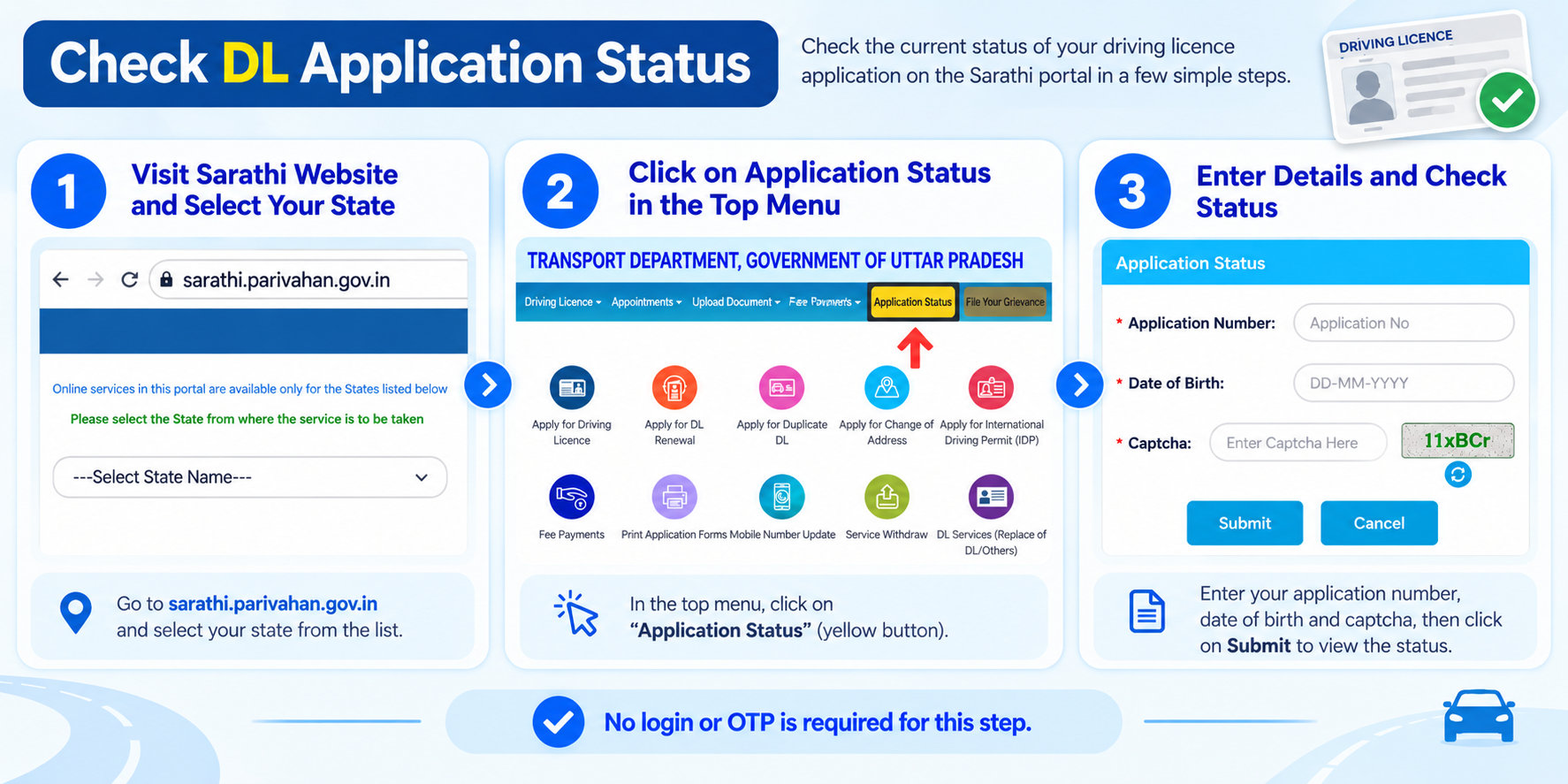
Go to sarathi.parivahan.gov.in, select your state, then choose Application Status under the dashboard menu. Enter your application number and date of birth to see where your application stands. No login or OTP is needed for this step.
What you’ll need
- Your application number, given to you when you submitted the learner’s or permanent licence application (it’s also on the acknowledgement/receipt you got at the time)
- Your date of birth, exactly as entered in the application
- The state you applied in (the RTO’s state, not necessarily where you currently live)
You don’t need to log in or verify an OTP to check status this way. If you’ve lost your application number, skip to the section below on finding it.
Step-by-step: check your status
-
Go to the Sarathi portal
Open sarathi.parivahan.gov.in in your browser. This is the official licensing portal under the Ministry of Road Transport and Highways, separate from the Vahan portal (which handles vehicle registration, not licenses).
-
Select your state
Choose the state you applied in from the list shown. Every state runs its own instance of Sarathi, so this step decides which RTO’s records you’re checking against.
-
Once your state loads, look on the dashboard menu and click Application Status from the options under it.
-
Enter your application number and date of birth
Fill in your application number, your date of birth, and the captcha code shown on screen. Double-check the application number, it’s easy to mistype a digit or letter.
-
Submit and read your status
Click Submit. The page will show your application’s current stage, for example whether your test slot is booked, your documents are still being checked, or your licence has been printed and is ready.
What the status result usually tells you
The exact wording can vary a little by state, but the result will fall into one of these stages.
Application received / under process
Your application has been submitted and is queued for review at the RTO. Nothing to do here except wait.
Test slot booked or pending
Shows if your learner’s test or driving test has been scheduled, and whether it’s already happened.
Documents under verification
The RTO is checking your submitted documents. If something’s missing, this is usually the stage where it shows up.
Licence printed / dispatched
Your licence has been approved and generated. For a physical card, this stage usually includes dispatch details.
Rejected or sent back
The RTO has flagged an issue, usually a missing or mismatched document. The status page or an SMS/email typically states the reason; you’ll need to fix it and reapply.
Lost your application number? Here’s how to find it
If you don’t have your application number handy, Sarathi has a separate lookup for this:
- On the Sarathi portal, go to the Other menu and select Find Application Number.
- Choose your state and RTO.
- Enter your name (first, middle, last as applicable) and date of birth, then complete the captcha.
- Click Get Details. An OTP is sent to the mobile number registered on your application.
- Enter the OTP to view your application number, then use it in the status-check steps above.
This only works if your application is at least a few weeks old and the mobile number on file still works. If both your application number and registered mobile number are unavailable, you’ll need to visit the RTO in person with your acknowledgement slip or ID proof.
If you’re getting “no record found”
- Double-check the state you selected, it must match where you actually applied
- Re-enter your date of birth in the same format as your application (usually DD/MM/YYYY)
- Confirm there’s no typo in the application number, especially between similar characters like 0/O or 1/I
- If you applied within the last day or two, the record may not be updated in the system yet, try again after 24 hours
Common questions
Can I check status without an application number?
Not directly. You’d first need to recover your application number using the “Find Application Number” lookup described above, since that’s what the status check is keyed to.
Does checking status cost anything?
No. Checking your application status on Sarathi is free. If any page asks you to pay to “check” or “expedite” your status, it isn’t the official portal.
I checked and it still shows “under process” after weeks. What now?
Processing times vary by RTO workload. If it’s been unusually long, contact your RTO directly with your application number rather than a third party or agent.
Is this the same portal for checking vehicle/RC status?
No. Vehicle registration and RC status is checked on the separate Vahan portal, not Sarathi. See our Vahan guide for that.
Ready to check your status?
This takes you straight to the official Sarathi portal. myrtobuddy.com is not affiliated with it.