
Check Your Vehicle’s RC and Registration Details Online
Whether you’re buying a used vehicle, checking your own RC, or confirming insurance and fitness validity, here’s exactly how to look up any vehicle’s registration details on the Vahan portal using its registration, chassis, and engine numbers.
Quick answer
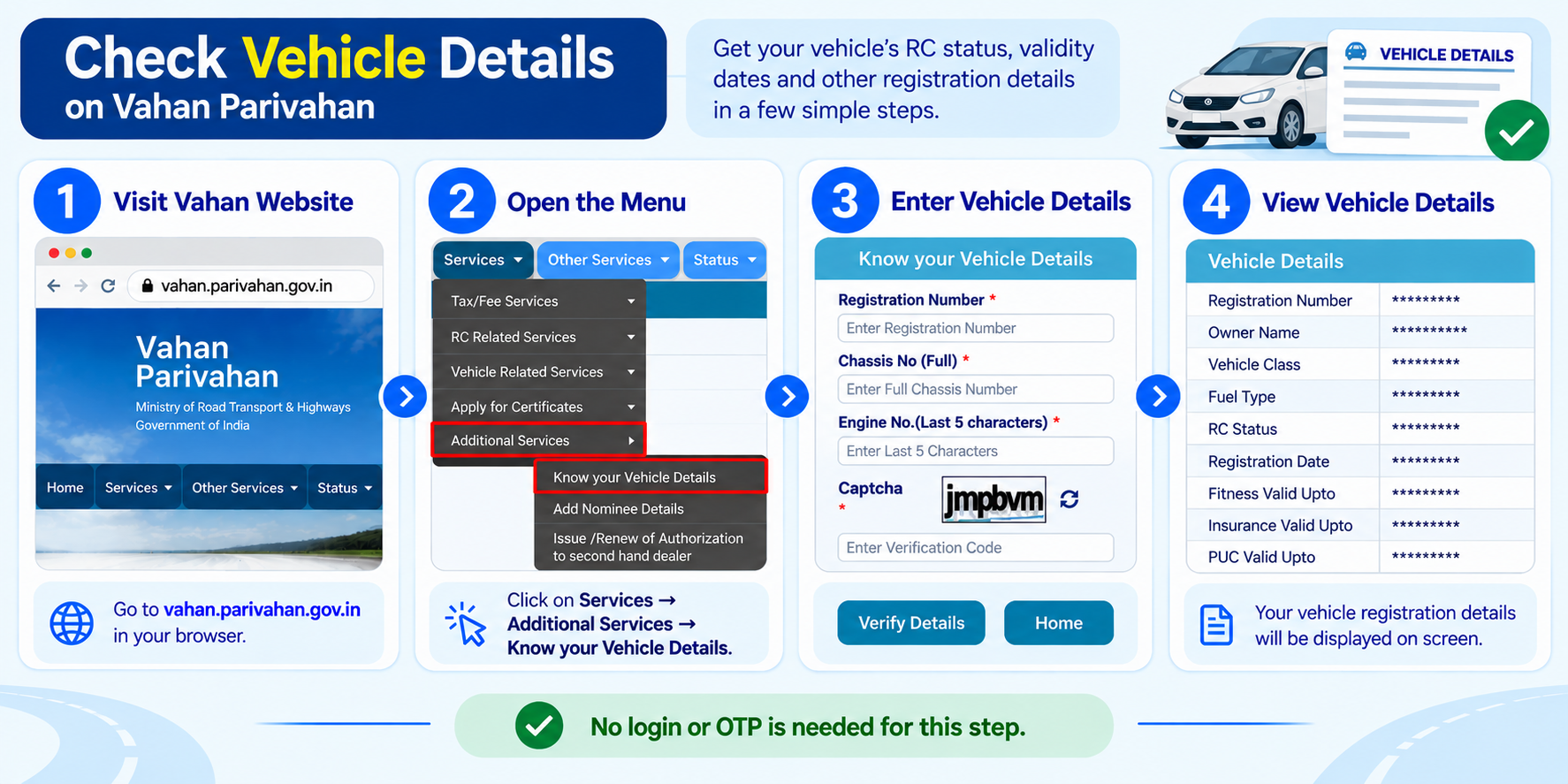
Go to vahan.parivahan.gov.in, open Services → Additional Services → Know your Vehicle Details, then enter the vehicle’s registration number, full chassis number, last 5 characters of the engine number, and captcha to see its RC status, validity dates, and other registration details. No login needed.
Why you’d check this
Buying a used vehicle
Confirm the registration is active (not cancelled or suspended), the chassis/engine numbers match the vehicle in front of you, and insurance/fitness aren’t already lapsed.
Renewing your own documents
See exactly which validity, fitness, PUC, insurance, or road tax, is closest to expiring, instead of digging through paper copies.
Before an interstate trip
Road tax and permit validity matter more when you’re crossing state lines. A quick check confirms nothing lapses mid-trip.
After a sale or transfer
Once an ownership transfer is approved, this lookup is how you confirm the RC actually reflects the change.
What you’ll need
- The vehicle registration number (the number plate), for example DL01AB1234
- The full chassis number, found on the RC card or the vehicle’s chassis plate
- The last 5 characters of the engine number, also on the RC card or stamped on the engine
There’s no login or OTP for this lookup, instead, Vahan asks for the chassis and engine numbers as proof you actually have access to the vehicle or its papers, since these aren’t printed on the number plate. If you’re checking a vehicle before buying it, ask the seller to show you the RC card, both numbers are on it.
Step-by-step: check a vehicle’s RC details
-
Go to the Vahan portal
Open vahan.parivahan.gov.in. This is the official vehicle-registration portal, separate from Sarathi (which handles driving licences, not vehicles).
-
Open “Know your Vehicle Details”
From the top menu, go to Services → Additional Services → Know your Vehicle Details, or jump straight to the Know your Vehicle Details form directly.
-
Fill in the registration, chassis, and engine numbers
Enter the Registration Number, the full Chassis No., and the last 5 characters of the Engine No., then complete the captcha.
-
Click “Verify Details”
Double-check the chassis and engine numbers before submitting, a single wrong character will fail the lookup.
-
Read the vehicle’s details
The result shows the vehicle’s registration date, class, fuel type, make and model, and the validity of its fitness, insurance, PUC, and road tax.
On your phone instead? The same RC details are available in the official mParivahan app (Android and iOS) under its RC details section. Download it only from the Play Store or App Store, search results are full of lookalike apps using the same name and icon.
What the result actually shows you
The exact layout varies a little by state, but you’ll generally see these groups of information.
Registration & vehicle info
Registration date, registering RTO, vehicle class, fuel type, and make/model.
RC status
Whether the registration is active, and basic details like chassis and engine number.
Validity dates
Fitness certificate, PUC (pollution certificate), insurance, and road tax validity, each with its own expiry date.
Fuel & emission norms
Fuel type (petrol, diesel, CNG, electric) and the emission standard the vehicle was registered under, for example BS-IV or BS-VI.
Owner details
The owner’s name is masked or withheld in this public lookup, it’s personal data and isn’t shown to anyone other than the owner or authorised bodies like the RTO or police.
What “RC status” actually means
The RC status field itself is a simple flag, here’s what each value tells you.
Active
The registration is valid and current. This is what a healthy, properly maintained vehicle should show.
Suspended
Registration has been temporarily put on hold by the RTO, often pending a compliance issue. Ask the seller or owner to clarify before proceeding with any transaction.
Cancelled
The registration no longer exists, the vehicle isn’t legally roadworthy under this RC. Treat this as a serious red flag if you’re buying.
Blacklisted / under a hold
The vehicle has a flag against it, for example from a police case or a request by an interested party. This needs to be resolved before any ownership change can go through.
Just applied for a new vehicle registration or an ownership transfer? This guide is for looking up an already-registered vehicle’s full RC details. If your application is still pending, use the separate Know Your Application Status tool instead, under the Status menu. It searches by application number or vehicle registration number with no login needed, but it only tracks pending applications, if there’s nothing in progress for that vehicle, it won’t show you the vehicle’s actual RC details. We’ll cover that tool in its own guide.
If you’re getting “no record found” or an error
- Re-check the registration number for typos, especially 0/O and 1/I
- Make sure there are no extra spaces or hyphens, type it exactly as it appears on the plate
- Enter the full chassis number, not a shortened version, and only the last 5 characters of the engine number
- If the vehicle was registered very recently, the record may not be updated in Vahan yet
Common questions
Can I see the vehicle owner’s name and address?
No. Owner details are personal data and are withheld or masked in this public lookup. Only the registered owner or authorised bodies like the RTO, police, or insurers can access full owner details.
Do I need to be the vehicle owner to check this?
No. Anyone can run this lookup, but you’ll need the chassis and engine numbers along with the registration number, so in practice it’s mainly the owner or someone who’s seen the RC card, like a buyer inspecting the vehicle before purchase.
Does this cost anything?
No, checking vehicle details on Vahan is free. Some private apps and websites charge for the same information, they’re pulling from the same public data.
Is this the same portal for checking driving licence status?
No. Driving licence and learner’s licence status is checked on the separate Sarathi portal, not Vahan. See our Driving License guide for that.
The RC status shows “suspended” or “blacklisted”, what does that mean for a purchase?
Don’t proceed until it’s resolved. It usually means the RTO or another authorised party has put a hold on the registration, for example over a compliance issue. Ask the seller to clear it first, or walk away.
Can I check pending challans (traffic fines) here too?
No, this lookup only covers registration and RC details. Challans are checked separately, we’ll cover that in its own guide.
Ready to check a vehicle’s details?
This takes you straight to the official Vahan portal. myrtobuddy.com is not affiliated with it.