
Check and Pay e-Challan Online (Official Portal)
Got an e-challan SMS, or want to know if your vehicle has a pending challan? Here is how to check it, pay it, download the receipt and raise a grievance on the official e-Challan portal – echallan.parivahan.nic.in, plus how to spot the fake challan messages going around.
Guides in this section
More challan guides, each checked against the official source.
Quick answer
Open echallan.parivahan.nic.in, choose Check Pending Challan Status or Pay Challan, pick Challan Number, Vehicle Number or DL Number, enter the captcha and click Get Details. Review the challan shown, pay online through the portal’s payment page, then download your payment receipt. Only ever use the official government address.
What you can do on the e-Challan portal
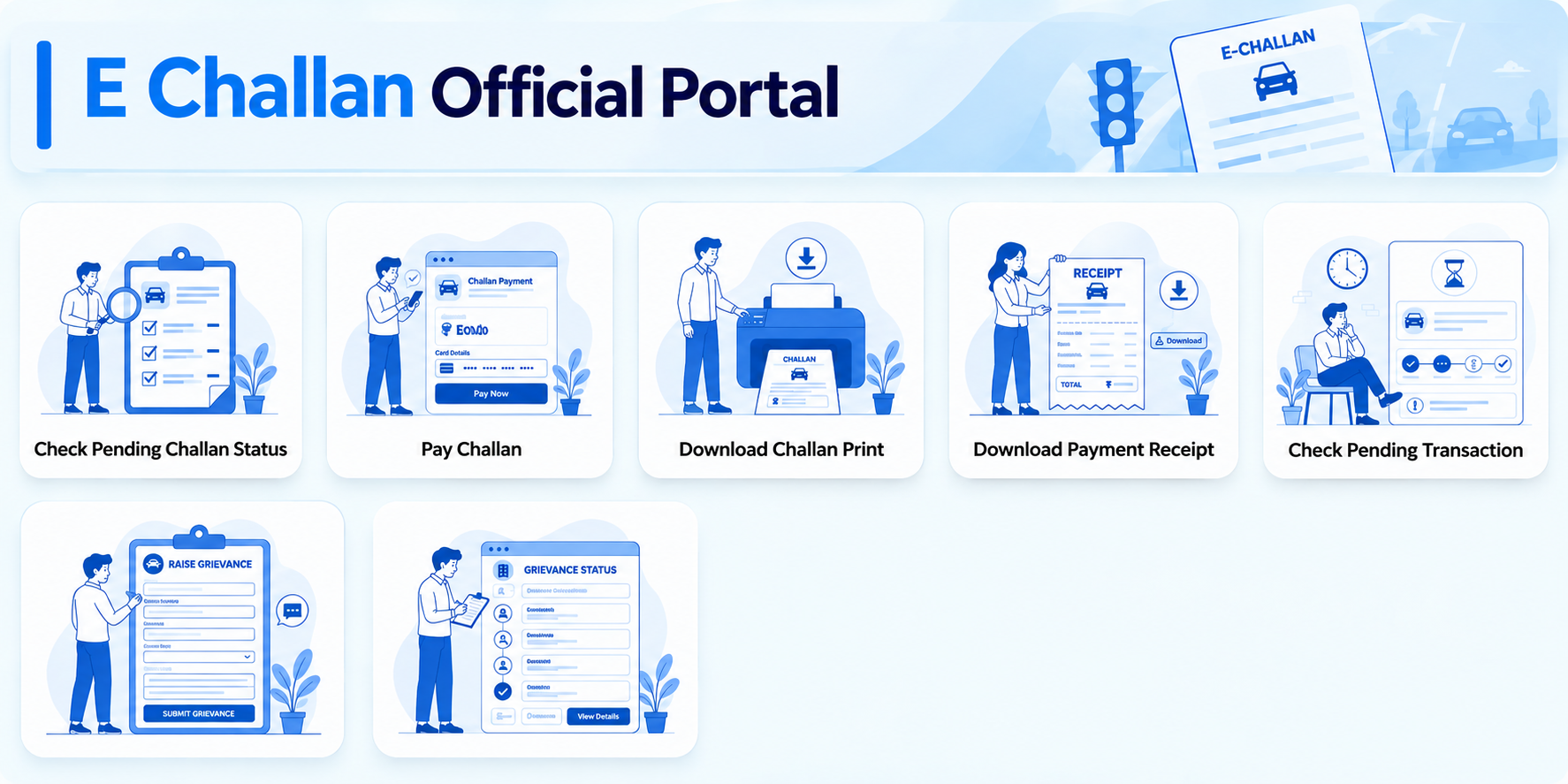
The portal’s home screen shows seven services. Most people only need the first two. Tap a service to see what it asks for.
-
You need: any one of the challan number, vehicle number or DL number, plus the captcha.
What happens: click Get Details and the portal shows the challan details linked to that number. If nothing is pending, there is no challan to pay.
-
You need: the same three search options (challan, vehicle or DL number) and the captcha.
What happens: review the vehicle number, date, place and violation first, then pay on the payment page. Cards, UPI and the mParivahan app are the ways NIC lists.
-
Use it for: a printable copy of the challan itself.
Open it from the portal home screen and follow the form it shows.
-
Use it for: your proof that the challan was cleared.
After paying, open it from the home screen, save the receipt and keep it.
-
You need: the challan number or the vehicle number, plus the captcha.
Use it when: your payment is pending, stuck or deducted from your account. Check the status here and do not pay a second time.
-
You need: the challan, vehicle or DL number and the captcha. The Grievance Entry Form opens with those three tabs.
What happens: describe the issue clearly and submit. Save the ticket (E-Ticket) number shown, because the status page asks for it. The authority decides the outcome.
-
You need: the Ticket Number, or the challan, vehicle or DL number, plus the captcha.
What happens: submit the search and the portal shows where your grievance stands.
Check Pending Challan Status
You need: any one of the challan number, vehicle number or DL number, plus the captcha.
What happens: click Get Details and the portal shows the challan details linked to that number. If nothing is pending, there is no challan to pay.
The screens shown here do not ask you to log in. You search with a challan, vehicle or DL number and a captcha. If a page asks for your card details before you have searched for anything, it is not the official portal.
What you need before you start
- Any one of these: the challan number (from the SMS or notice), your vehicle registration number, or your driving licence number
- A phone or computer with internet, the portal works in a normal browser
- A payment method for the portal’s payment page, depending on what the page offers
If you do not have the challan number, searching by vehicle number or DL number is the easiest way to see what is pending against you.
How challans reach you: As per NIC, e-challans are generated from sources such as CCTV cameras, automatic number plate recognition and speed guns, with photo evidence, and the notice goes to the contact details registered with the vehicle. If the mobile number on record is old, you may never see the SMS, so it is worth searching your vehicle number on the portal now and then, and updating your mobile number on Vahan.
Step-by-step: check for a pending challan
-
Open the official portal
Type echallan.parivahan.nic.in into your browser yourself. Do not tap a link from an SMS or a forwarded message.
-
Select “Check Pending Challan Status”
Choose this tile on the home screen. You will see a form with three tabs: Challan Number, Vehicle Number and DL Number.
-
Pick a tab and enter the number
Select the tab that matches what you have and type the number carefully. Then type the characters shown in the captcha. If it is hard to read, the refresh icon next to it loads a new one.
-
Click “Get Details”
The button stays greyed out until the fields are filled. Once you click it, the portal shows the challan details linked to the number you entered. If nothing is pending, you will not see a challan to pay.
Buying or selling a used vehicle? Search the vehicle number on the portal before the deal is completed. Pending challans are linked to the vehicle number, so you can see what is outstanding, and you only need the registration number and the captcha to search. See also our guide to transferring vehicle ownership.
Step-by-step: pay a challan
Paying uses the same kind of form. Check the details before you pay.
-
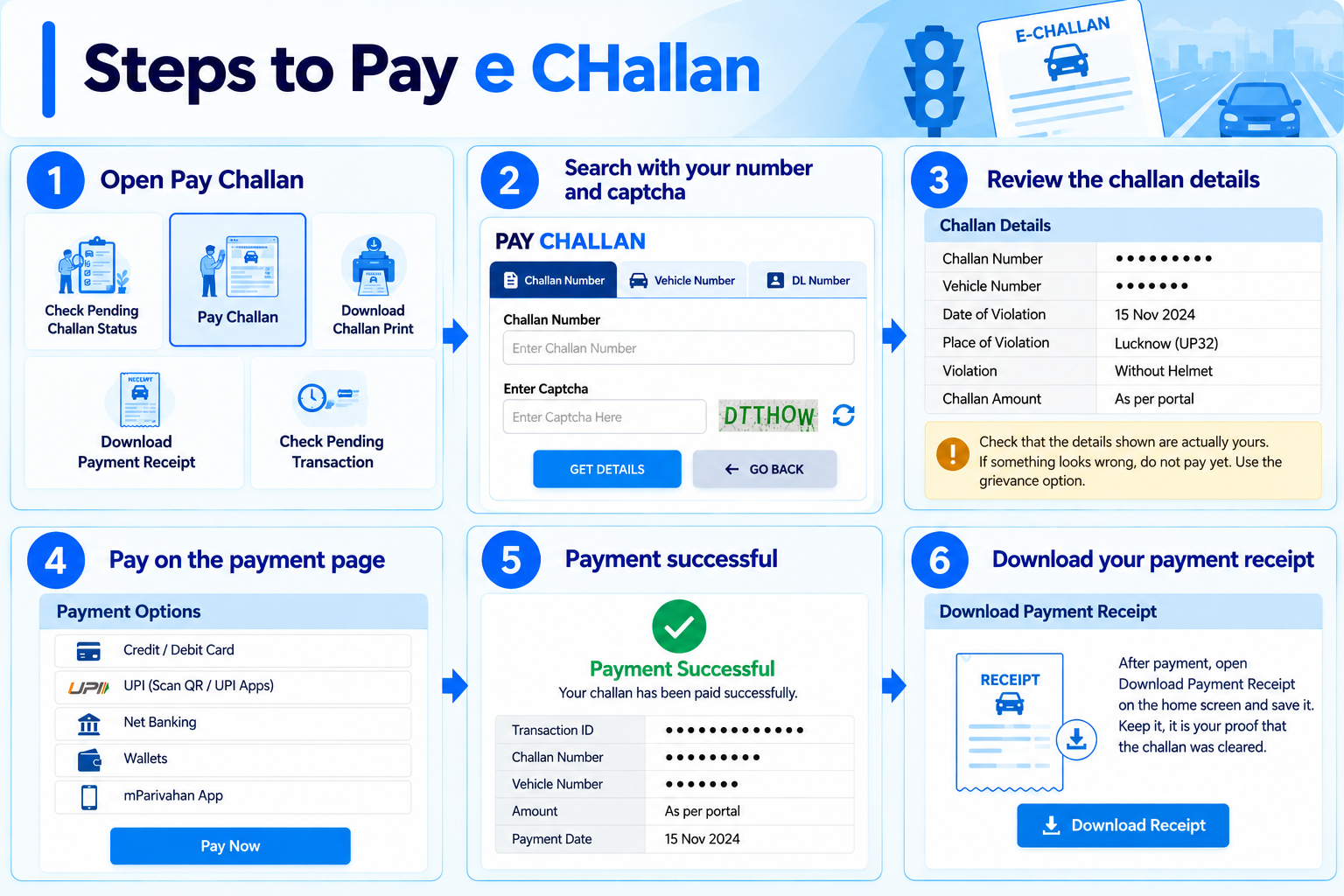
Select “Pay Challan”
From the portal home screen, open Pay Challan. It opens a form titled Pay Challan with the same three tabs.
-
Search with your number and captcha
Choose Challan Number, Vehicle Number or DL Number, enter it, fill the captcha and click Get Details.
-
Review the challan before paying
Check that the details shown, such as the vehicle number, date, place and violation, are actually yours. The amount depends on the violation and your state, so take it from the portal, not from a message or a website that quotes a figure. If something looks wrong, do not pay yet. Use the grievance option below.
-
Pay on the payment page
Continue to the payment page and pay using an option it offers. The e-Challan system, run by NIC, lists cards, UPI (including a dynamic QR code) and the mParivahan app as ways to pay. Keep the page open until it confirms the payment.
-
Download your payment receipt
After payment, open Download Payment Receipt on the home screen and save it. Keep it, it is your proof that the challan was cleared. A printable copy of the challan itself is under Download Challan Print.
NIC lists the NextGen mParivahan app alongside the web portal as another way to pay. Use the app only from the official store listing, and never through a link sent in a message.
Money deducted but challan still shows pending?
The portal’s own notice board covers this case. Do not pay a second time.
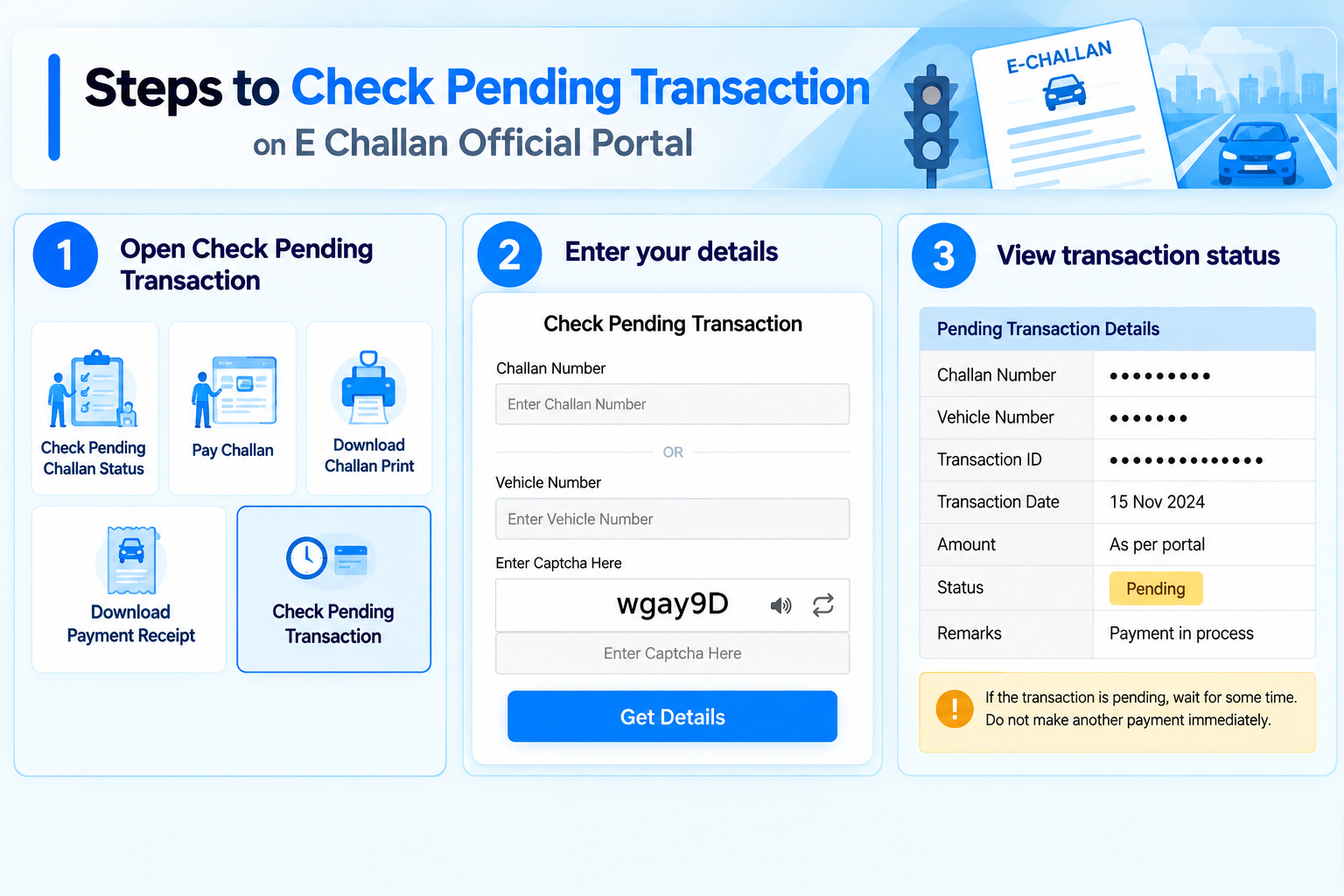
Use “Check Pending Transaction”
The notice board on the payment page says: if your payment is pending, stuck or deducted from your account, use the Check Pending Transaction service to verify your transaction status.
Enter challan or vehicle number
That form asks for either the challan number or the vehicle number, plus the captcha.
Wait, then check again
Check the transaction status again before assuming the payment failed, and do not pay twice.
Keep your proof
Save the bank SMS, the transaction reference and any screenshot of the payment. If the amount stays deducted, your bank can help you trace it.
If you think a challan is wrong: raise a grievance
The portal has a grievance option for challans you believe are incorrect. It records your complaint. The decision rests with the authority.
-
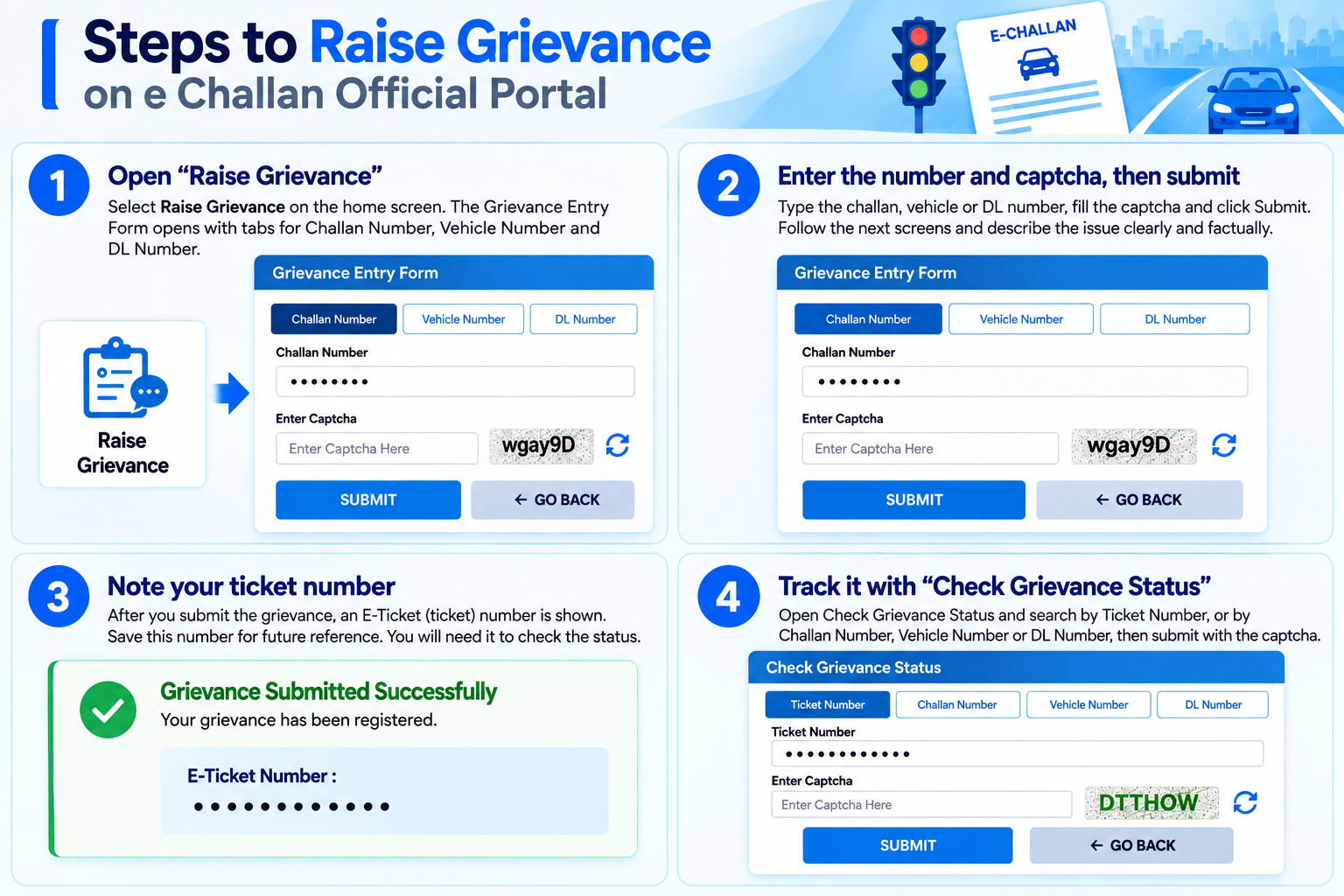
Open “Raise Grievance”
Select Raise Grievance on the home screen. The Grievance Entry Form opens with tabs for Challan Number, Vehicle Number and DL Number.
-
Enter the number and captcha, then submit
Type the challan, vehicle or DL number, fill the captcha and click Submit. Follow the next screens and describe the issue clearly and factually.
-
Note your ticket number
Save the ticket (E-Ticket) number shown after you submit. The status page asks for it.
-
Track it with “Check Grievance Status”
Open Check Grievance Status and search by Ticket Number, or by Challan Number, Vehicle Number or DL Number, then submit with the captcha.
Note: this guide explains how the portal works. It is not legal advice. For a serious dispute, speak to the traffic authority that issued the challan or a qualified lawyer.
What happens if a challan stays unpaid
Ignoring a challan does not make it go away.
According to NIC, which runs the e-Challan system, an e-challan that is not paid within 90 days is automatically forwarded to the Virtual Court. Our virtual court guide shows how to find and pay it there. NIC also states that after this period, the licensing and registering authorities may not process applications related to the driving licence or vehicle registration.
In practice, that can hold up things you need later, such as a licence renewal. Rules and how they are applied can differ by state, so treat this as a general picture and confirm with your transport office if you are unsure.
Fake e-challan messages: how to stay safe
- The official portal is echallan.parivahan.nic.in, run by NIC under Parivahan. Government addresses end in .nic.in or .gov.in. A link that only looks similar, or ends in something else, is not official.
- Be careful with an unexpected SMS or WhatsApp message about a challan, especially one asking you to pay urgently through a link.
- A fake site may take you straight to a payment page without asking for any vehicle, DL or challan number. The real portal makes you search first.
- Never share your card PIN, CVV or OTP with anyone who contacts you about a challan.
- To verify a message, open the official portal yourself and search with your vehicle number. Do not use the link in the message.
- If you paid on a fake site, tell your bank immediately and report it at cybercrime.gov.in or call 1930.
Common questions
How do I check if my vehicle has a challan?
Open the official e-Challan portal, choose Check Pending Challan Status, select the Vehicle Number tab, enter your registration number and the captcha, and click Get Details.
How much is my challan?
It depends on the violation and the state. The exact amount for your challan is shown on the portal, so rely on that and not on a figure quoted in a message or on another website. To see the penalty the Motor Vehicles Act sets for an offence, use our traffic fine finder.
I paid, but the challan still shows pending. Should I pay again?
No. Use Check Pending Transaction with your challan number or vehicle number to see the status, and keep your bank message and transaction reference as proof.
Can I dispute a challan I think is wrong?
You can raise a grievance on the portal with Raise Grievance, then follow it with Check Grievance Status. The authority decides the outcome.
What if I do not pay for a long time?
As per NIC, an unpaid e-challan is sent to the Virtual Court after 90 days, and licence or registration services may not be processed until it is dealt with. See our virtual court guide.
Can I check challans on a vehicle I plan to buy?
Yes. Search the registration number under Check Pending Challan Status. It shows the pending challans linked to that vehicle, so you can ask the seller to clear them before the deal is done.
How do I know a challan message is genuine?
Do not trust the link. Open echallan.parivahan.nic.in yourself and search with your vehicle number. If nothing is pending there, be cautious about the message and do not pay through its link.
Ready to check your challan?
This takes you straight to the official e-Challan portal. myrtobuddy.com is not affiliated with it.