
Pay a Traffic Challan in the Virtual Court Online (vcourts.gov.in)
If your e-challan was not paid in time, it may have gone to the virtual court. Here is how to find the case on the official Virtual Courts portal, pay the proposed fine with an OTP, and what changes if you choose to contest it.
Quick answer
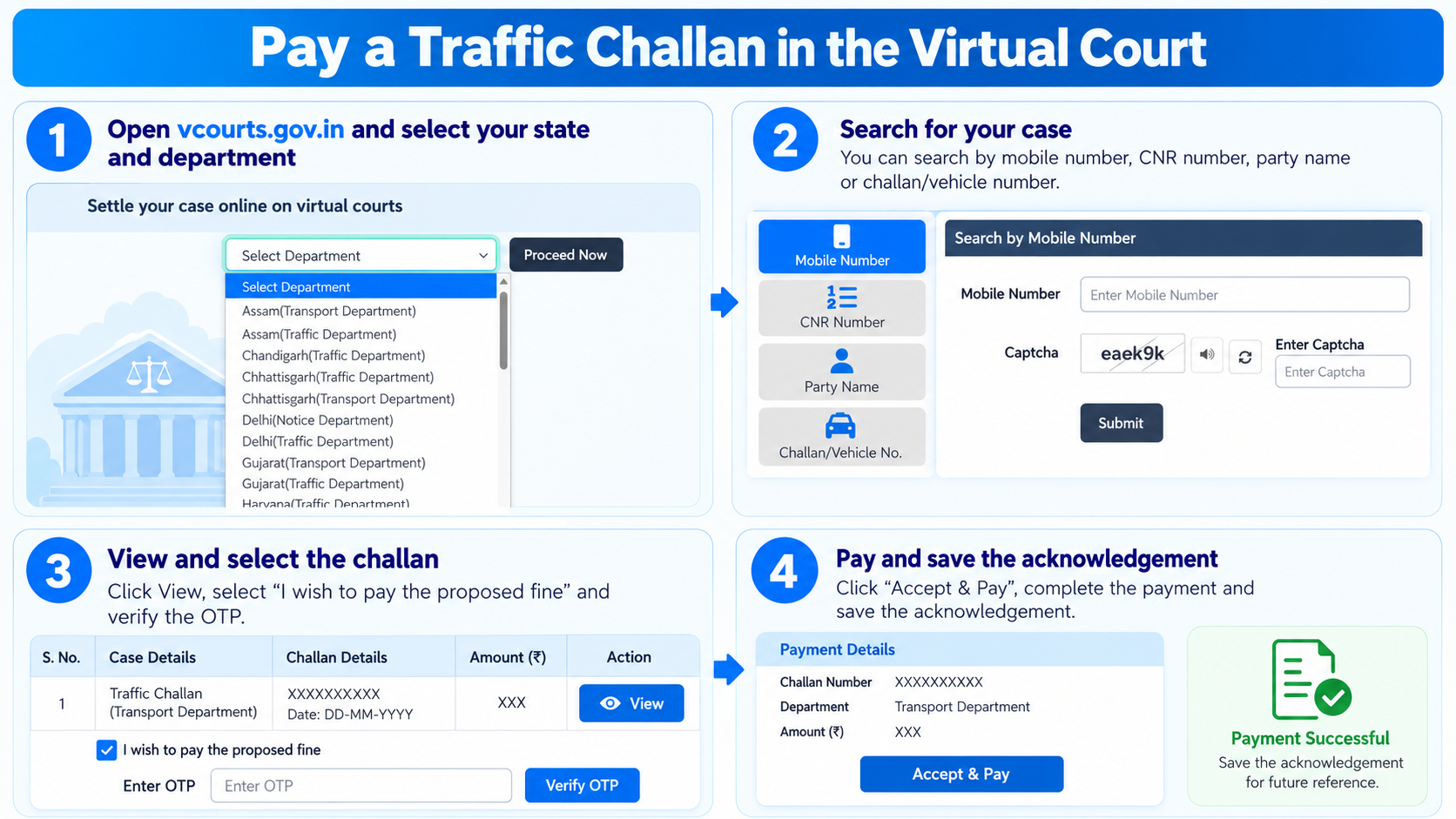
On vcourts.gov.in, choose your state and department under Select Department and click Proceed Now. Search by mobile number, CNR number, party name or challan/vehicle number, click View, select I wish to pay the proposed fine, verify the OTP and click Accept & Pay. Save the acknowledgement.
When does a challan go to the virtual court?
A challan that reaches the virtual court is paid there, not on the e-challan portal.
Unpaid for 90 days
According to NIC, which runs the e-challan system, an e-challan that is not paid within 90 days is forwarded to the virtual court.
It becomes a court case
In the virtual court the challan is handled as a case. The court shows a proposed fine, which you can pay online or choose to contest.
Check that your state is listed
The portal lists departments state by state, such as traffic, transport or notice departments. Check that the department that issued your challan is in the list before you start.
e-Challan portal or virtual court?
Where you pay depends on where the challan is now.
| e-Challan portal | Virtual court | |
|---|---|---|
| Website | echallan.parivahan.nic.in | vcourts.gov.in |
| When | The challan is pending and has not been sent to court | The challan has been sent to court, for example after 90 days unpaid |
| Amount | Shown on the challan | The proposed fine shown by the court |
| Verification | Number and captcha | Number, captcha and an OTP before paying |
| If you disagree | Raise a grievance on the portal | Choose to contest, and the case goes to the regular court |
Keep these ready
Any one of these is enough to find your case.
Mobile number
The mobile number linked to the challan. The portal also sends an OTP before you pay, so keep the phone with you. If your number has changed, see how to update it on Vahan.
Challan or vehicle number
The challan number from the SMS or notice, or the registration number of the vehicle.
CNR number
If you already have the case reference (CNR) number, you can search with it directly.
Online payment method
Payment goes through the court’s ePay payment gateway.
Step-by-step: pay a challan in the virtual court
These steps follow the Virtual Courts portal and its user manual.
-
Open the Virtual Courts portal
Go to vcourts.gov.in. Under Settle your case online on virtual courts, open the Select Department list, choose your state and department, for example Delhi (Traffic Department), and click Proceed Now.
-
Search for your case
Pick one of the four search options: Mobile Number, CNR Number, Party Name or Challan/Vehicle No. Enter the detail, type the captcha (the speaker icon reads it out, and the refresh icon loads a new one) and click Submit.
-
Check the case details
The results show the case number, challan number, party name, mobile number, offence, the Act and section, and the proposed fine. Click View on your case to open it, and make sure the details are yours.
-
Choose to pay and verify with OTP
Select I wish to pay the proposed fine. Click Generate OTP, enter the OTP you receive and click Verify OTP. Then accept the terms and click Accept & Pay.
-
Pay and save the acknowledgement
Complete the payment on the ePay payment gateway. When it succeeds, an acknowledgement is shown. Save or print it, since it is your proof that the fine was paid.
If you want to contest the challan
Think about this before you click, because it changes how the case is handled.
Instead of paying, you can choose to contest the case. The portal asks for an OTP and your remarks, and you accept the terms. The case is then transferred to the regular court, and online payment is no longer available for it.
The portal also notes that for adjudication you may have to appear in court in person or through a lawyer. If you are not sure, take advice before you choose to contest.
Get the receipt again
Search your case again the same way, click View, then Reprint, and verify with an OTP. You can then print the acknowledgement.
Mistakes to avoid
- Paying on the e-challan portal or a lookalike site. Once a challan is in the virtual court, pay it on vcourts.gov.in. Do not use a link from an SMS or WhatsApp message.
- Choosing the wrong department. Pick the state and department that issued the challan, such as traffic or transport.
- Clicking contest by mistake. After that, the case leaves the online payment route.
- Sharing the OTP. Never give the OTP to anyone who offers to settle the challan for you.
Common questions
Can I search without the challan number?
Yes. You can search by mobile number, CNR number or party name instead.
Why is the amount different from my original challan?
In the virtual court, the court shows a proposed fine for the case. Pay the amount shown on the portal, not a figure from an old message. To see the penalty the Motor Vehicles Act sets for an offence, use our traffic fine finder.
Can a challan be settled in a Lok Adalat?
In some states, pending traffic challans are also taken up in National Lok Adalats held by the Legal Services Authorities. Dates and how to register differ by state, so check with your state Legal Services Authority or traffic police.
What if my state or department is not in the list?
If you cannot find the department that issued your challan, contact the traffic police or the district court of the place where the challan was issued.
How do I check if I have a pending challan at all?
Search your vehicle or DL number on the official e-challan portal first. Our e-challan guide shows how.
Is it safe to pay online?
Yes, on the official portal. Payment goes through the court’s ePay gateway after OTP verification.
Sources: the steps follow the official Virtual Courts portal and its end user manual. The 90 day rule is as stated by NIC for the e-challan system.
Disclaimer: MyRTOBuddy is an independent guide and is not affiliated with any government body or court. This is general information and not legal advice. For a serious dispute, speak to a qualified lawyer.
Ready to settle your challan?
This takes you to the official Virtual Courts portal. myrtobuddy.com is not affiliated with it.